
The dashboard is your homepage for WP Squared. You can navigate back here from anywhere in WP Squared by clicking on the globe icon on the right hand side, or on our logo. This is your portal to managing each of your websites. Below, we'll discuss all of the icons on the dashboard.
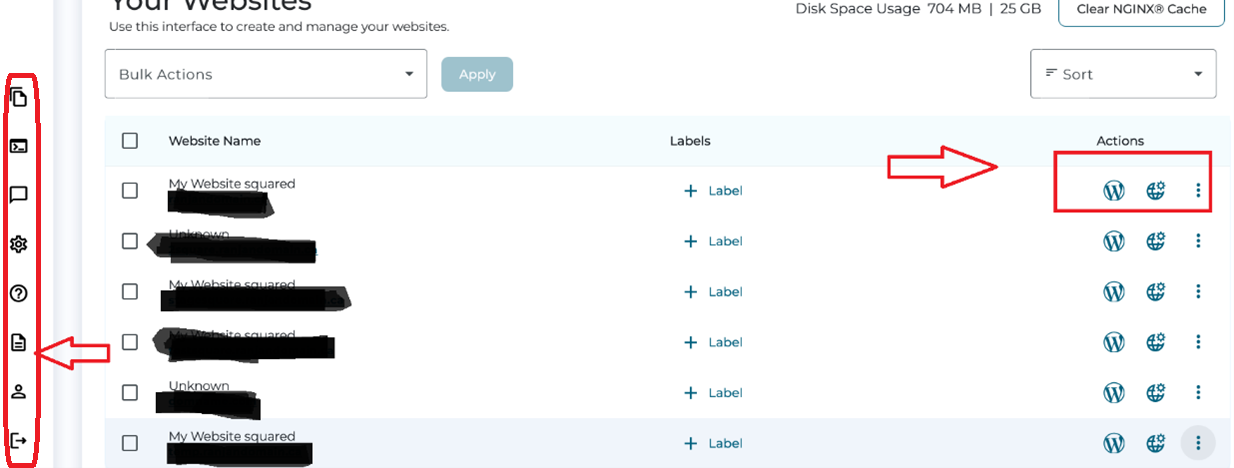
Left Sidebar
From top to bottom...
- File manager - a file system interface for managing files related to your websites. Advanced users may find a use for this.
- Terminal - a low-level command system for managing your websites. This is for advanced users to interact with their websites using BASH, use with great caution. WP-CLI is available through this terminal by using the "wp" command from the directory root of your website, located at ".../public_html/domain_name/" where "domain_name" is the domain name for your website.
- Feedback area - a place to submit feedback to the developers of WP Squared. If you need support, please go through our client portal or email one of our support ticket addresses to start a support ticket.
- Help - leads to a page where you can submit a support ticket to us.
- Documentation - leads to our knowledgebase... But you already found that!
- Account Profile - a place to manage your WP Squared password, language, and two factor authentication settings. Please note that this is a separate login system from your client portal.
- Logout - logs you out of your Wordpress hosting area. This is separate from your client portal session.
Website Actions
From left to right...
- Log in to Wordpress Admin (WP Admin) - this is where you can manage your web content.
- Manage Website - More on that in other articles.
- Domain Details - this is another important website management area. This pops up a sub-menu including the following:
- Add Forwarding - redirect domains, useful if you have archaic or subtly different domain names.
- Manage Zones - a DNS records editing area. What are DNS records? Click here.
- Modify Domain - change the domain name that leads to this website.
- Delete - deletes the website.
