
Follow these steps to change the FTP quota or set it to Unlimited
1. Log in to your cPanel account.
2. In the Files section, click on FTP Accounts.
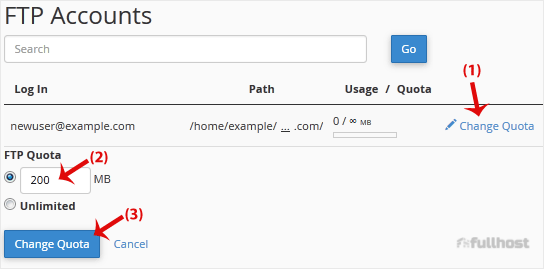
FTP Quota: Specify the quota in numerical words or select Unlimited.
4. Click on Change Quota.
Follow these steps to change the FTP quota or set it to Unlimited
1. Log in to your cPanel account.
2. In the Files section, click on FTP Accounts.
FTP Quota: Specify the quota in numerical words or select Unlimited.
4. Click on Change Quota.
To change the main root FTP account, you have to change the password of your cPanel account....
You can access the FTP account using the cPanel login details, which gives you full access to the...
If you want to delete an FTP account, you can accomplish it by following this tutorial. 1....
cPanel only supports one SFTP account per cPanel. This FTP account is created by default and has...
Are you sure you want to permanently delete this sensitive data? This action cannot be undone, and the information will no longer be accessible.
