
1. Log in to your cPanel account.
2. In the Domains section, click on Redirects.

3. Scroll down to the end of the page. Under Current Redirects, locate the domain and click on remove.
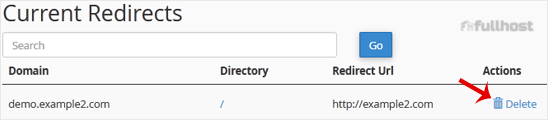
4. For confirmation, click on Remove Redirect once more.

1. Log in to your cPanel account.
2. In the Domains section, click on Redirects.
3. Scroll down to the end of the page. Under Current Redirects, locate the domain and click on remove.
4. For confirmation, click on Remove Redirect once more.
1. Log in to your cPanel account. 2. In the Domains section, click on Addon Domains. 3....
A subdomain is an additional part of your primary domain. Please, follow this tutorial to remove...
1. Log in to your cPanel account.2. In the Domains section, click on Subdomains. 3. Under...
You can redirect your add-on domain to another domain. 1. Log in to your cPanel account. 2. In...
1. Log in to your cPanel account. 2. In the Domains section, click on Aliases. 3. Under...
Are you sure you want to permanently delete this sensitive data? This action cannot be undone, and the information will no longer be accessible.
